4.1 KiB
4.1 KiB
Breadcrumb
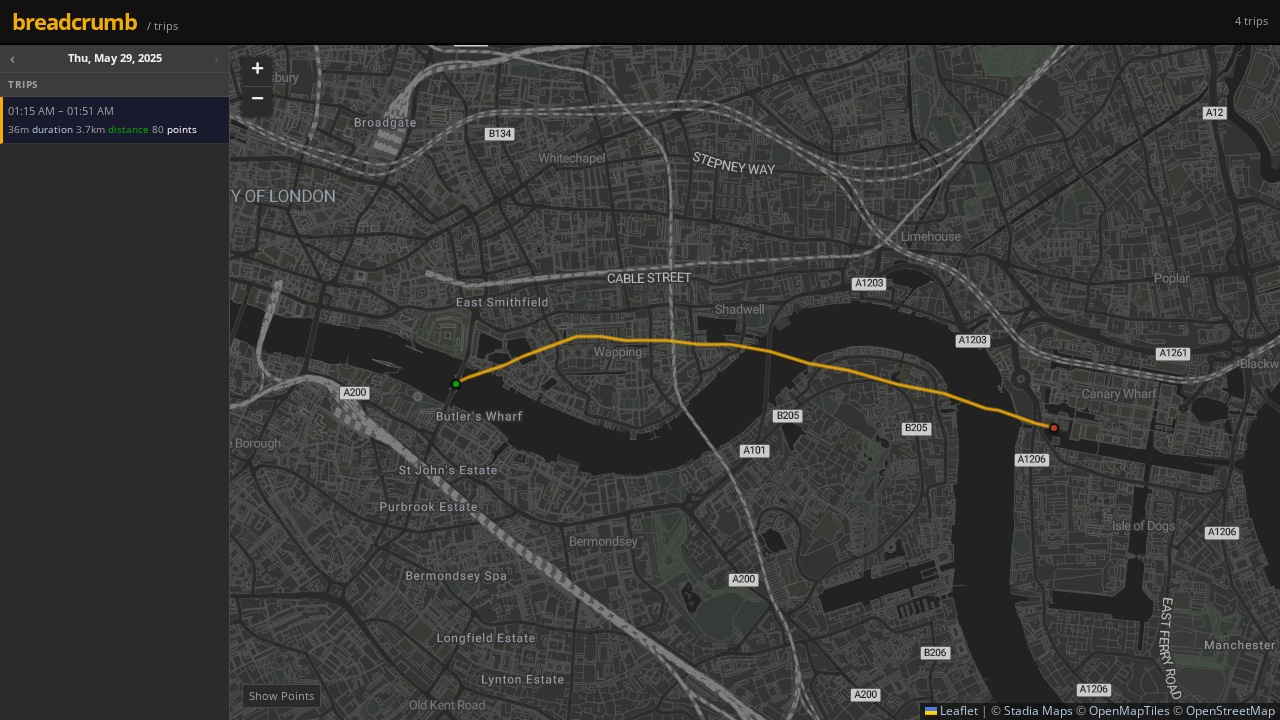
A self-contained Go server that receives GPS location data from the Colota Android app, stores it in an SQLite3 database, and serves a web frontend for browsing trips on a map.
Quick Start
# Build
go build -o breadcrumb .

# Run (no auth, default port 8080, db = ./locations.db)
./breadcrumb

# Run with Bearer token auth on port 443
./breadcrumb -port 443 -token mysecrettoken -db /var/data/locations.db
Flags
| Flag | Default | Description |
|---|---|---|
-port |
8080 |
HTTP listen port |
-db |
locations.db |
Path to the SQLite3 database file |
-token |
(empty) | Bearer token for auth. Empty = authentication off. |
API
POST /api/location ← Colota app sends here
Headers: Content-Type: application/json
Body (Colota default payload):
{
  "lat":  51.495065,
  "lon":  -0.043945,
  "acc":  12,
  "alt":  519,
  "vel":  0,
  "batt": 85,
  "bs":   2,
  "tst":  1704067200,
  "bear": 180.5
}
| Field | Type | Required | Description |
|---|---|---|---|
lat |
float | ✓ | Latitude (decimal degrees) |
lon |
float | ✓ | Longitude (decimal degrees) |
acc |
float | ✓ | Accuracy (metres) |
tst |
int | ✓ | Unix timestamp (seconds). Falls back to server time. |
alt |
float | Altitude (metres) | |
vel |
float | Speed (m/s) | |
bear |
float | Bearing (degrees, 0–360) | |
batt |
int | Battery level (0–100 %) | |
bs |
int | Battery state: 0=unknown 1=unplugged 2=charging 3=full |
GET variant is also supported (query parameters with the same field names).
Returns: 200 OK on success.
GET /api/locations ← Query stored locations
| Param | Default | Description |
|---|---|---|
limit |
100 |
Max records to return (up to 500 000) |
page |
1 |
Page number (1-based) |
from |
Filter: Unix timestamp lower bound | |
to |
Filter: Unix timestamp upper bound |
Response:
{
  "total":   42,
  "page":    1,
  "limit":   100,
  "records": [ { "id": 1, "lat": 51.495065, "lon": -0.043945, ... } ]
}
GET /api/trips
Returns location points grouped into trips (gaps > 30 min = new trip), newest first.
GET /health
Returns server status and total location count.
Colota App Configuration
- Open Colota → Settings → API Settings
- Select template: Custom
- Set Endpoint URL to
http(s)://your-server:8080/api/location - HTTP Method: POST
- If using a token: set Authentication → Bearer Token to your
-tokenvalue - Leave field mapping at defaults
- Tap Test Connection — you should see
200 OK
Docker
docker build -t breadcrumb .

docker run -d \
  --name breadcrumb \
  -p 8080:8080 \
  -v breadcrumb-data:/data \
  breadcrumb -token "$TOKEN"
Database Schema
CREATE TABLE locations (
  id          INTEGER PRIMARY KEY AUTOINCREMENT,
  lat         REAL    NOT NULL,
  lon         REAL    NOT NULL,
  acc         REAL    NOT NULL,
  alt         REAL,
  vel         REAL,
  batt        INTEGER,
  bs          INTEGER,
  tst         INTEGER NOT NULL,   -- Unix timestamp
  bear        REAL,
  received_at TEXT    NOT NULL    -- ISO-8601 UTC
);
CREATE INDEX idx_locations_tst ON locations(tst);